

昨天我們完成了 IPv4 路由轉發決策(Routing):
Ethernet (L2) ──► IPv4 (L3) ──► Routing (Local Delivery vs Forwarding)
我們的 Network Stack 已經具備判斷「這個封包是不是要送給我這台主機(10.0.0.2)」的能力。
但隨之而來的是傳輸層(Transport Layer, L4)的核心問題:
假設電腦收到 Destination IP = 10.0.0.2,這確實是我的主機,但同一台電腦上同時跑著 Chrome、Discord、DNS Client、線上遊戲……
作業系統到底該把這個封包交給哪一個應用程式?
答案就是:Port(連接埠)。
struct udp_hdr):嚴格對齊 RFC 768,透過 __attribute__((packed)) 確保 Header 剛好為 8 Bytes。IPPROTO_UDP,並呼叫 udp_receive()。ntohs() 轉為主機字節序,正確印出 Source Port、Destination Port、Length 與 Checksum。udp_bind():模擬應用程式向作業系統註冊/監聽特定 Port。udp_lookup():封包抵達時,快速查詢目標 Port 是否有程式在等待接收。[UDP] Deliver to Port 8080。[UDP] No listener。10.0.0.2)。10.0.0.2:8080)。常見知名 Port(Well-Known Ports, 0 ~ 1023):
53:DNS(網域名稱解析)80:HTTP(網頁傳輸)443:HTTPS(加密網頁傳輸)67 / 68:DHCP(動態主機設定)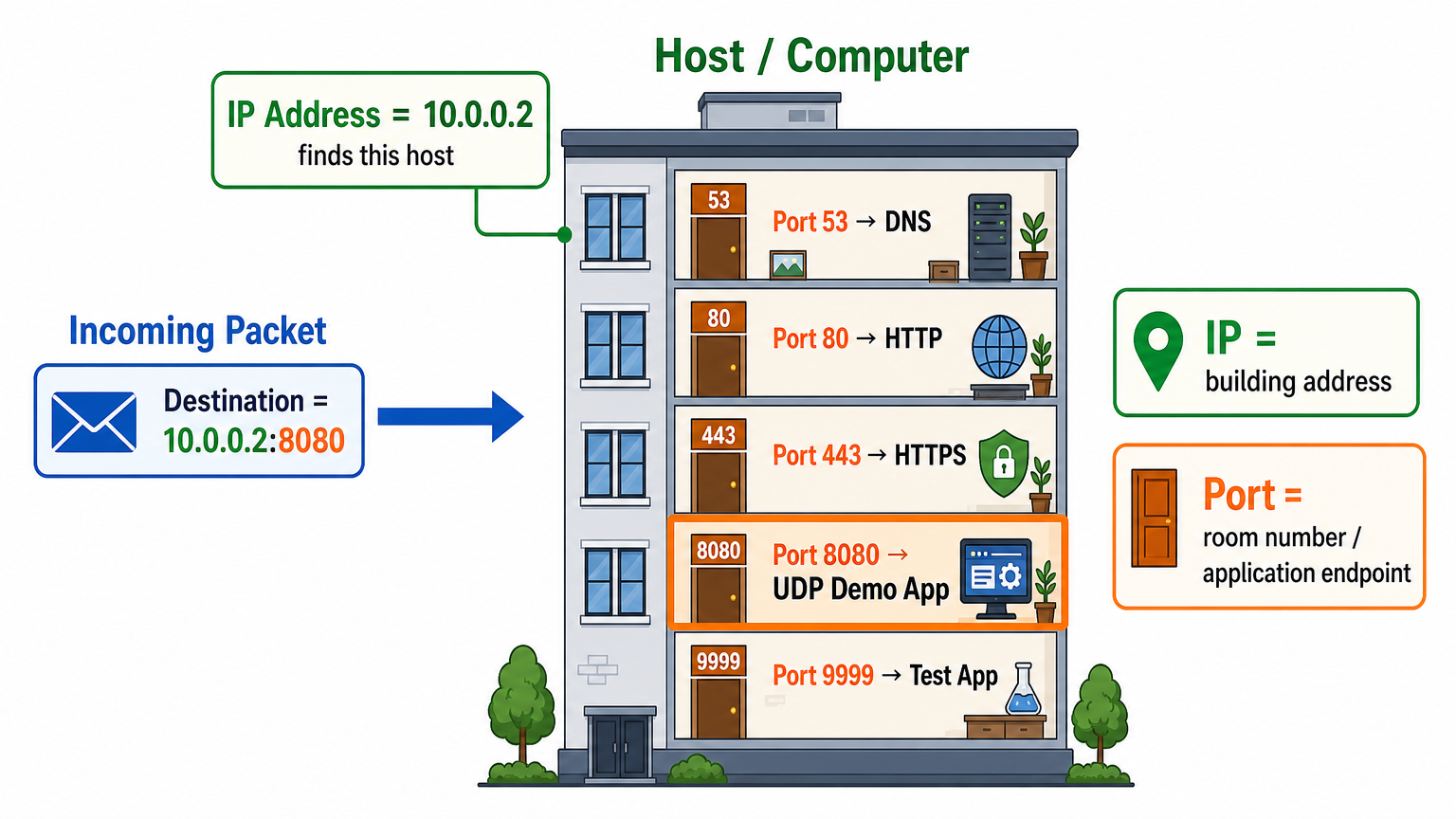
IPv4 Header 中的 Protocol 欄位決定了上層的協定種類:
1 ➔ ICMP(網路控制與除錯)6 ➔ TCP(傳輸控制協定)17 ➔ UDP(使用者資料報協定)| 特性 | TCP (Transmission Control Protocol) | UDP (User Datagram Protocol) |
|---|---|---|
| 連線狀態 | 連線導向(Connection-Oriented,需三向交握) | 無連線(Connectionless) |
| 可靠性 | 保證送達、超時重傳、擁塞控制 | 不保證送達(盡力而為 Best Effort) |
| 封包順序 | 保證順序正確(有 Sequence Number) | 不保證順序(可能亂序) |
| 標頭開銷 | 至少 20 Bytes(複雜) | 固定 8 Bytes(極致輕量) |
| 適用情境 | 網頁 (HTTP)、檔案傳輸 (FTP)、SSH、資料庫 | DNS、DHCP、語音視訊 (VoIP)、線上遊戲、即時串流 |
作業系統核心內部的 Socket Table 就像大樓管理員的「住戶登記名冊」:
Destination Port。bind(8080) ➔ 將資料遞交給應用程式緩衝區(Deliver)。No listener,尚未實作 ICMP Port Unreachable。56994)作為 Source Port,並登記入表。56994,作業系統才能依照名冊將回信正確交回發送者手中。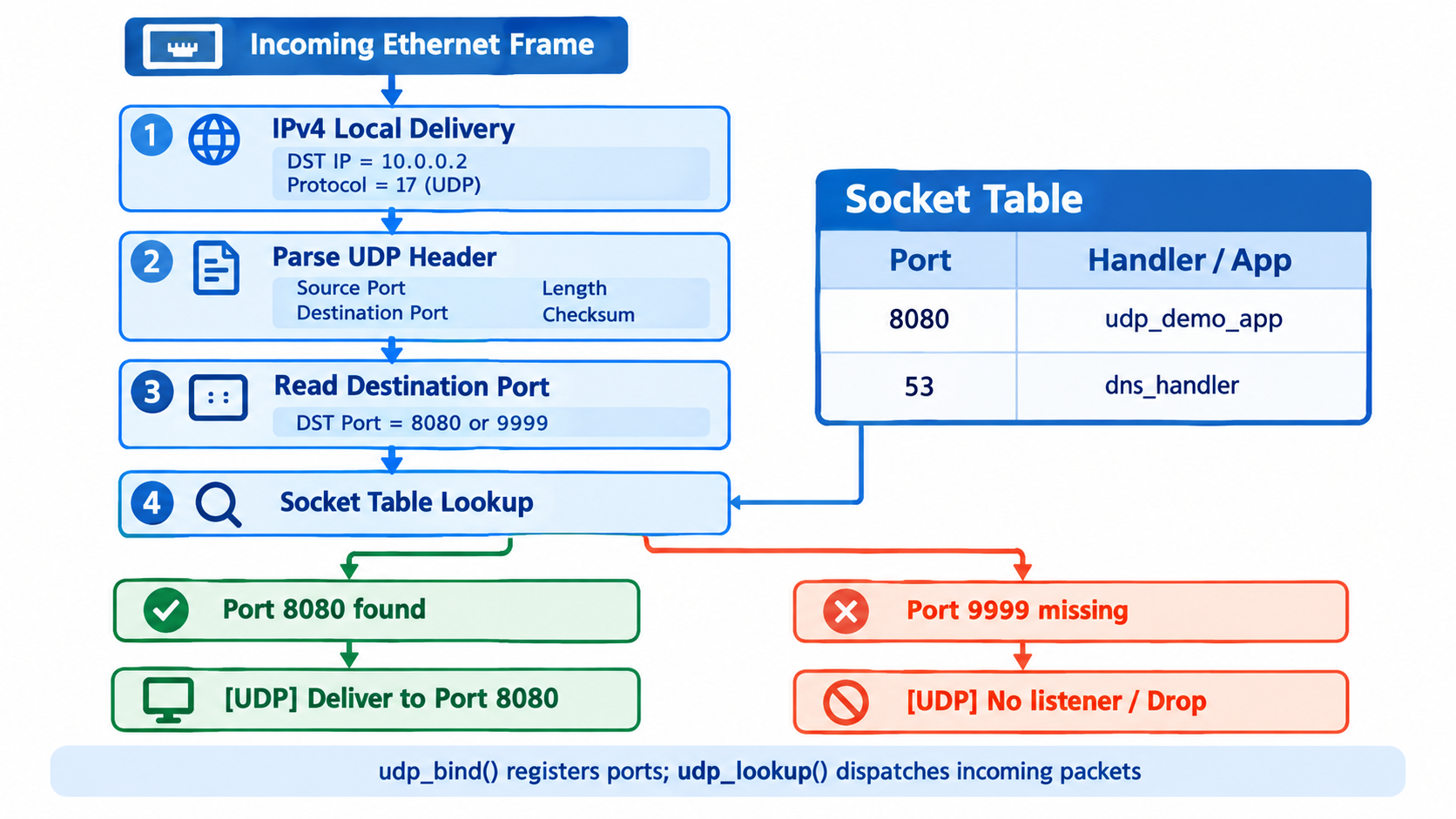
UDP 標頭極度精簡,僅由 4 個 16-bit 欄位組成,合計剛好 8 Bytes:
include/udp.h:結構定義與函式原型#ifndef UDP_H
#define UDP_H
#include <stdint.h>
#include <stddef.h>
#define UDP_HEADER_LEN 8
#define MAX_UDP_SOCKETS 16
/* UDP Header (RFC 768) - 固定 8 Bytes */
struct udp_hdr
{
uint16_t src_port;
uint16_t dst_port;
uint16_t length;
uint16_t checksum;
} __attribute__((packed));
/* 簡單的 UDP Socket 結構 */
struct udp_socket
{
uint16_t port;
};
/* 函式宣告 */
void udp_init(void);
int udp_bind(uint16_t port);
struct udp_socket *udp_lookup(uint16_t port);
void udp_print_header(const struct udp_hdr *udp);
void udp_receive(int fd, const uint8_t *buffer, size_t len);
#endif /* UDP_H */
src/udp.c:Socket Table 管理與封包接收分派#include <stdio.h>
#include <string.h>
#include <arpa/inet.h>
#include "ethernet.h"
#include "ipv4.h"
#include "udp.h"
/* Socket Table: 紀錄本機正在監聽哪些 Port */
static struct udp_socket udp_table[MAX_UDP_SOCKETS];
void udp_init(void)
{
memset(udp_table, 0, sizeof(udp_table));
}
int udp_bind(uint16_t port)
{
if (port == 0) return -1;
if (udp_lookup(port) != NULL) return -1; // 已被綁定
for (int i = 0; i < MAX_UDP_SOCKETS; i++) {
if (udp_table[i].port == 0) {
udp_table[i].port = port;
printf("[UDP] Bound to port %u\n", port);
return 0;
}
}
return -1; // 表格已滿
}
struct udp_socket *udp_lookup(uint16_t port)
{
for (int i = 0; i < MAX_UDP_SOCKETS; i++) {
if (udp_table[i].port == port) {
return &udp_table[i];
}
}
return NULL;
}
void udp_print_header(const struct udp_hdr *udp)
{
printf("\nUDP Packet\n-------------------\n");
printf("Source Port : %u\n", ntohs(udp->src_port));
printf("Destination Port : %u\n", ntohs(udp->dst_port));
printf("Length : %u\n", ntohs(udp->length));
printf("Checksum : 0x%04x\n\n", ntohs(udp->checksum));
}
void udp_receive(int fd, const uint8_t *frame, size_t len)
{
(void)fd;
if (len < ETH_HEADER_LEN + sizeof(struct ipv4_hdr) + sizeof(struct udp_hdr)) return;
const uint8_t *payload = frame + ETH_HEADER_LEN;
const struct ipv4_hdr *ip = (const struct ipv4_hdr *)payload;
uint8_t ihl = (ip->version_ihl & 0x0F) * 4;
if (len < ETH_HEADER_LEN + ihl + sizeof(struct udp_hdr)) return;
const struct udp_hdr *udp = (const struct udp_hdr *)(payload + ihl);
// 1. 印出 UDP Header
udp_print_header(udp);
// 2. 取得目的 Port (需注意網路字節序轉換)
uint16_t dst_port = ntohs(udp->dst_port);
// 3. Port Lookup: 查詢 Socket Table
struct udp_socket *sock = udp_lookup(dst_port);
if (sock) {
printf("[UDP] Deliver to Port %u\n", dst_port);
} else {
printf("[UDP] No listener\n");
}
fflush(stdout);
}
src/tap.c:IPv4 Protocol Dispatcher 串接 // IPv4 Protocol Dispatcher
switch (ip->protocol) {
case IPPROTO_ICMP:
icmp_receive(fd, buffer, n);
break;
case IPPROTO_UDP:
udp_receive(fd, buffer, n);
break;
default:
break;
}
Terminal 1(執行 Network Stack):
make clean && make
sudo ./network
啟動輸出:
[UDP] Bound to port 8080
TAP device: tap0 (UP)
Waiting for Ethernet frame...
Terminal 2(Linux 發送測試封包):
# 設定 Linux 主機端 tap0 IP
sudo ip addr add 10.0.0.1/24 dev tap0 2>/dev/null || true
sudo ip link set tap0 up

# 測試 A:發送到 Port 8080(有監聽)
echo "hello" | nc -u -w 1 10.0.0.2 8080

# 測試 B:發送到 Port 9999(無監聽)
echo "hello" | nc -u -w 1 10.0.0.2 9999
在 Terminal 1 的輸出中,我們目睹了網路底層最真實的運作過程:
Ethernet Frame
-------------------------
Destination : ff:ff:ff:ff:ff:ff
Source      : c6:bf:60:33:9d:73
EtherType   : 0x0806
[ARP] Request for 10.0.0.2 received -> Generating ARP Reply
[ARP] Reply sent (42 bytes)
Frame length: 42 bytes

[ACCEPT]
Ethernet Frame
-------------------------
Destination : 02:00:00:00:00:01
Source      : c6:bf:60:33:9d:73
EtherType   : 0x0800

IPv4 Packet
------------------
Version      : 4
Header Length: 20 bytes
TTL          : 64
Protocol     : 17
Checksum     : 0x3afb (OK)
Source IP    : 10.0.0.1
Destination IP : 10.0.0.2

[IPv4] Local Delivery (for me)

UDP Packet
-------------------
Source Port      : 56994
Destination Port : 8080
Length           : 14
Checksum         : 0xa9c0

[UDP] Deliver to Port 8080
Frame length: 48 bytes
10.0.0.1)想要傳 UDP 給 10.0.0.2,但不知道 10.0.0.2 的 MAC 地址。因此 Linux 必須先發送廣播(ff:ff:ff:ff:ff:ff,EtherType 0x0806)向全區網詢問。我們的 Network Stack 即時回覆了 ARP Reply。02:00:00:00:00:01,EtherType 0x0800,Protocol 17),順利送達並觸發 [UDP] Deliver to Port 8080! Network Stack Architecture (Day 12)
Ethernet (L2)
│
┌────────────────┴────────────────┐
│ │
ARP (0x0806) IPv4 (0x0800)
│ │
ARP Request / Reply IPv4 Checksum Verify
│ │
ARP Table TTL Check & Decrement
│
┌──────────┴──────────┐
▼ ▼
TTL == 0 TTL > 0
(Time Exceeded) │
▼
Destination Check
│
┌───────────────┴───────────────┐
▼ ▼
Local Delivery Not for me
(ip->dst == LOCAL_IP) │
│ ▼
Protocol Dispatcher Routing Table
│ (Lookup Netmask)
┌───────────────────────┴───────────────────────┐ │
▼ ▼ ▼
ICMP (Protocol = 1) UDP (Protocol = 17) Route / Forward
│ │
┌────────┴────────┐ UDP Header Parsing
│ │ (Src/Dst Port, Len)
Echo Request Echo Reply │
(Type = 8) (Type = 0) Socket Table
(Lookup Dst Port)
│
┌───────────────┴───────────────┐
▼ ▼
Port Found No Listener
(Deliver to Port) (DROP)
今天我們學會了「看懂 UDP」以及作業系統如何透過 Port 找到對應的程式。
明天(Day 13),我們將正式邁入 L4 應用層資料處理:
"hello")。

 iThome鐵人賽
 看影片追技術